SASA helps enterprise SAP teams accelerate implementation workflows across documentation, technical design, ABAP development, testing, migration, and SAP BTP integration. Built for ECC, S/4HANA, and BTP environments, it reduces manual effort while improving consistency, traceability, and delivery speed.
SASA Features
Core Capabilities for Faster SAP Implementation
SASA is an AI-powered platform built to accelerate SAP implementation across ECC, SAP S/4HANA, and SAP BTP environments.
It helps enterprise SAP teams:
Reduce delivery time, cost, and execution risk
Automate functional, technical, testing, integration, and migration workflows
Support ABAP development and SAP BTP integration
Improve consistency, traceability, and delivery predictability
Reduce rework across complex SAP implementation programs
Functional Design Specification (FDS) Creation
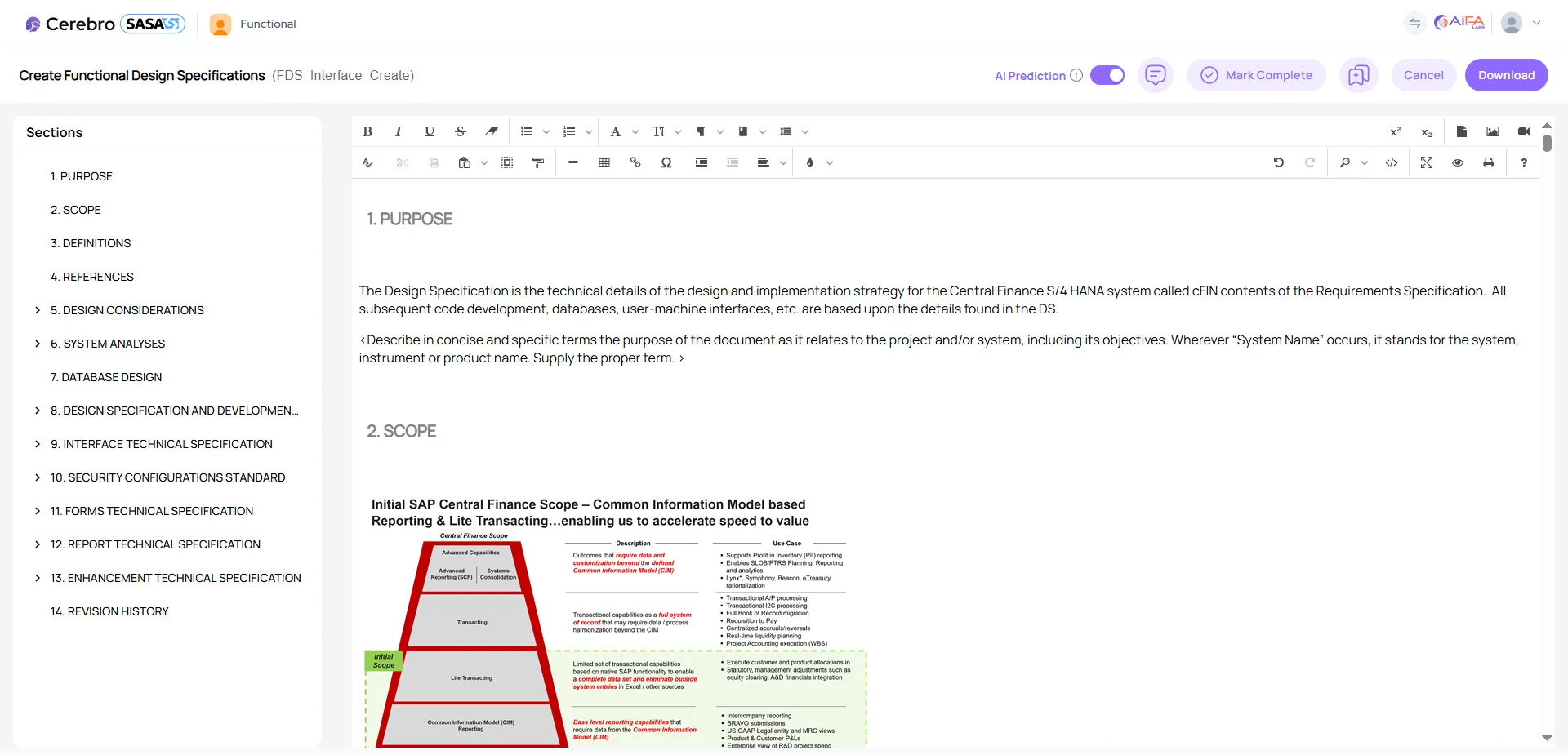
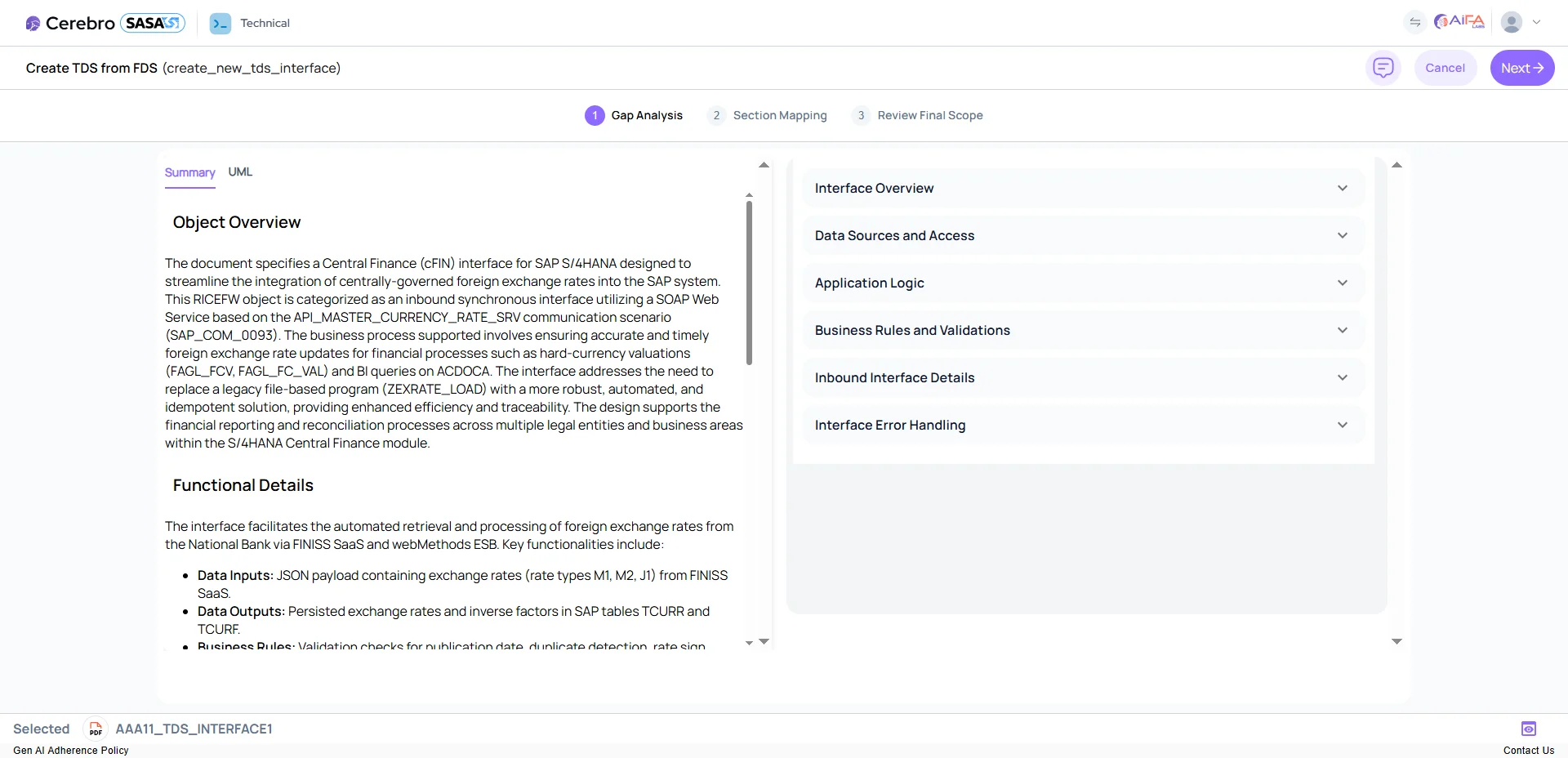
SASA converts business requirements documents (BRDs) into complete, SAP WRICEF-aligned functional design specification documents. Built for SAP implementation and SAP SDLC workflows, it supports SAP-standard or client-specific templates, highlights AI-generated sections, suggests functional logic, and provides SAP domain assistance through an integrated chatbot. The output is a polished, editable, audit-ready Word document.
Key Benefits:
Reduces FDS creation time by up to 30%.
Improves consistency across SAP functional specification documents.
Minimizes requirement gaps, rework, and downstream delivery delays.
Functional Unit Test (FUT) Creation
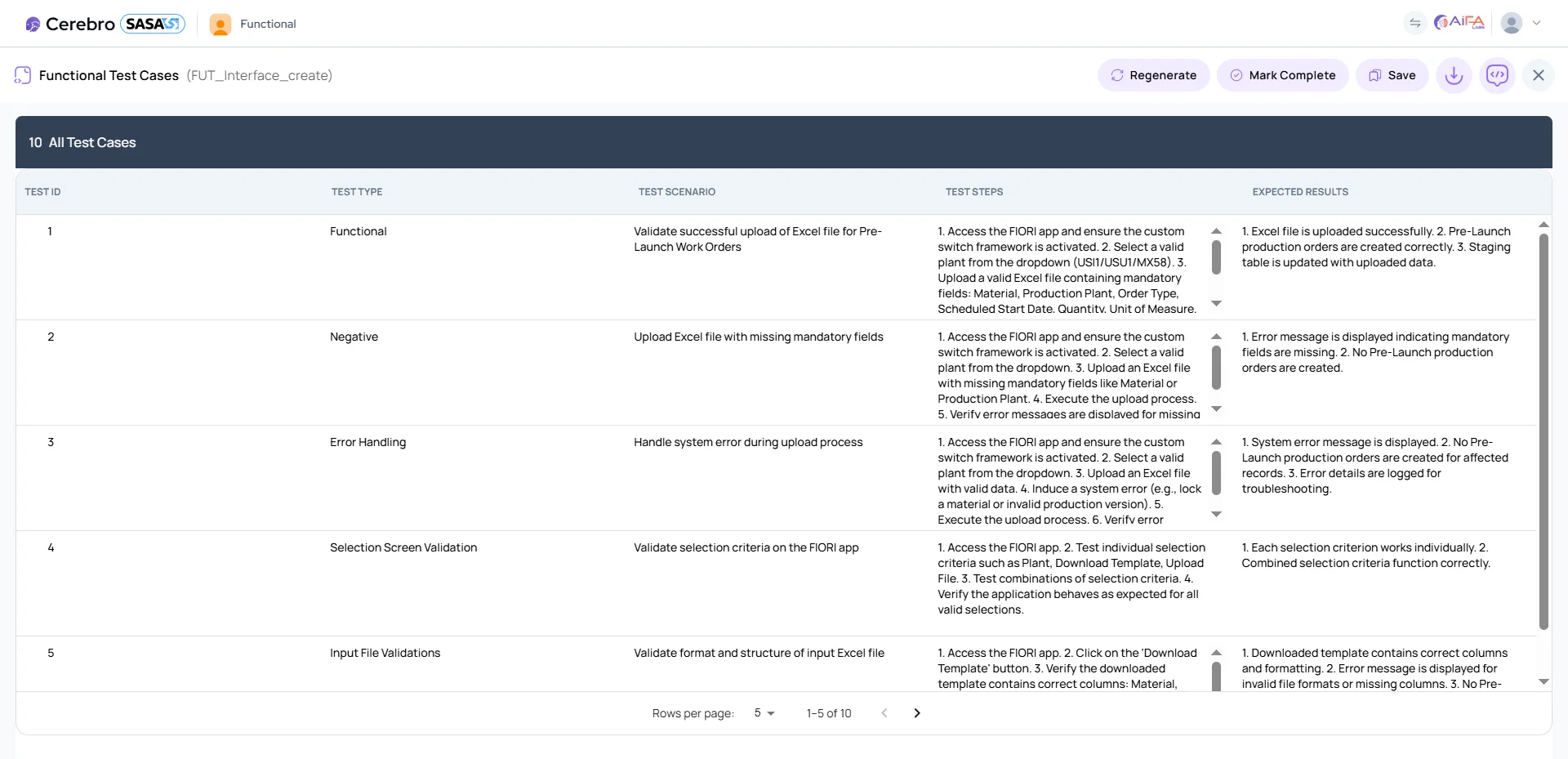
SASA auto-generates functional unit test cases directly from the FDS, producing scenario descriptions, test IDs, steps, and expected results using SAP-aligned templates. Built for SAP testing automation, it supports intelligent section regeneration, provides testing guidance through a functional chatbot, and exports ready-to-review documentation in Word or Excel.
Key Benefits:
Ensures functional test cases stay aligned with the FDS.
Reduces manual test documentation effort by up to 30%.
Strengthens early QA, UAT readiness, and SAP implementation traceability.
Functional Unit Test (FUT) Migration
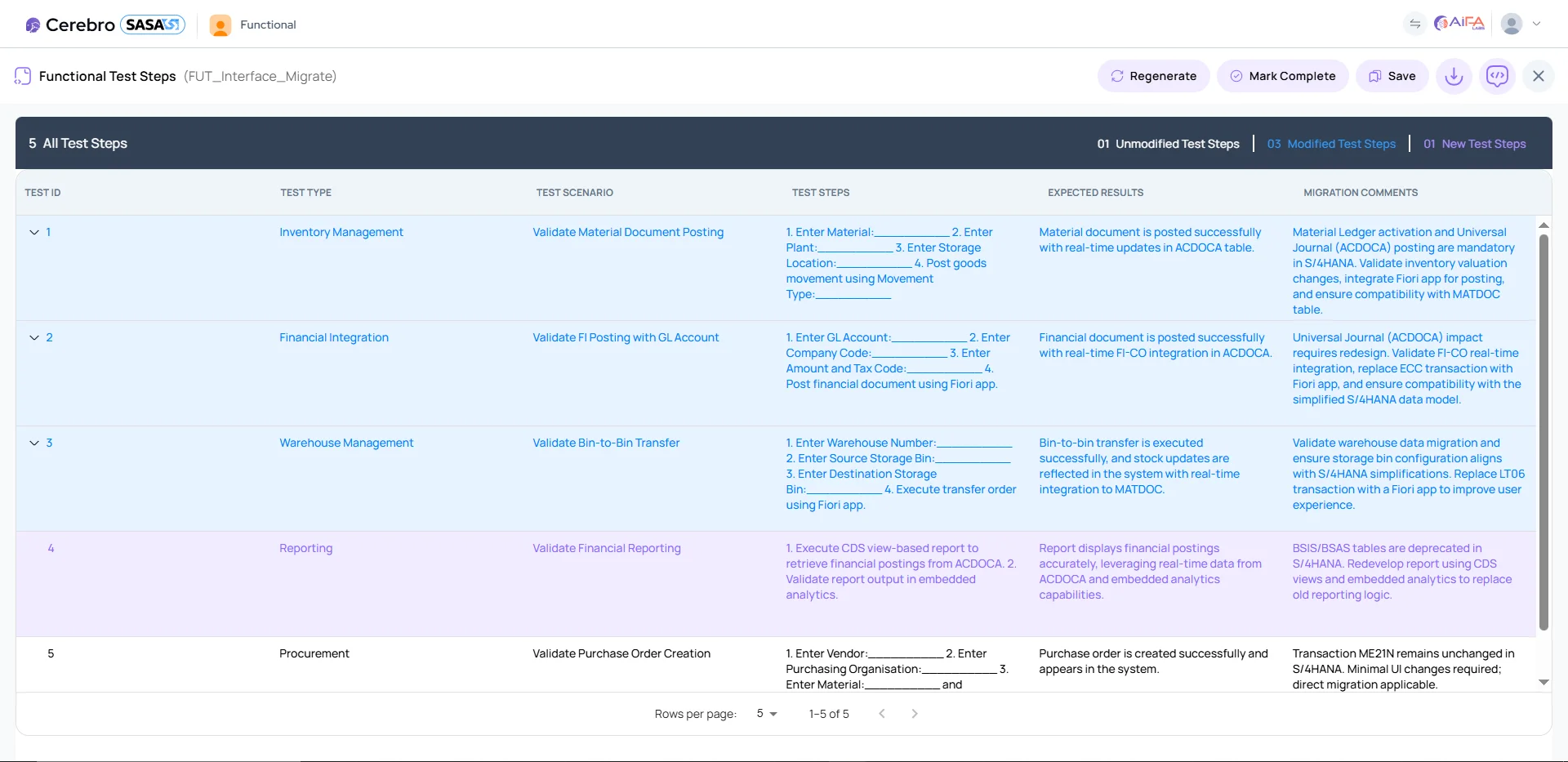
SASA accelerates the migration of existing FUT test cases during SAP upgrades, SAP S/4HANA migration, and modernization programs by identifying unchanged, updated, and missing scenarios. It provides side-by-side comparisons, impact insights, and migration quality assessments to help teams maintain SAP testing automation continuity across changing system requirements.
Key Benefits:
Reduces SAP migration effort and prevents missed test scenarios.
Maintains test consistency across SAP upgrades and system changes.
Shortens upgrade and testing cycles while improving SAP implementation traceability.
System Integration Test (SIT) Migration
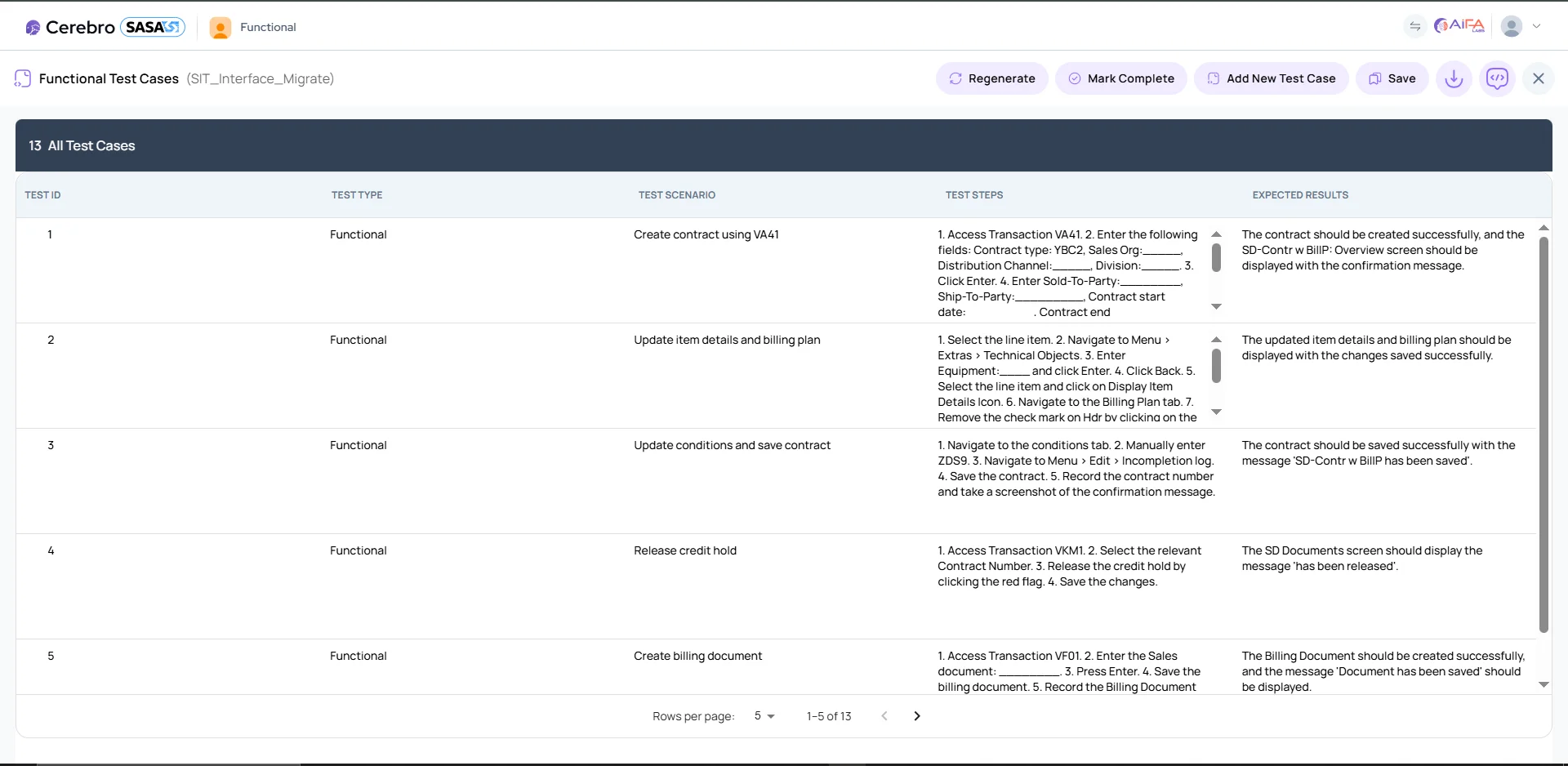
SASA automates SIT test case updates by analyzing new requirements, system changes, and integration dependencies across SAP implementation and modernization programs. It highlights integration flow differences, regenerates impacted scenarios, and uses AI assistance to guide users through complex SAP module dependencies and SAP BTP integration workflows.
Key Benefits:
Simplifies multi-module SAP integration testing.
Reduces SIT preparation and review time during SAP upgrades and migrations.
Keeps integration flows accurate, traceable, and up to date across SAP implementation workflows.
Technical Design Specification (TDS) Generation
SASA converts functional specifications into complete technical design specification documents for SAP implementation and SAP SDLC workflows. It extracts technical objects, generates data models, UML diagrams, validation rules, and flow sequences, while providing SAP technical clarification through AI chatbot assistance. The output is a fully formatted, developer-ready Word document that helps accelerate ABAP development and downstream delivery.
Key Benefits:
Bridges functional-to-technical gaps with precise SAP technical documentation.
Reduces rework and accelerates development kickoff across SAP implementation projects.
Ensures SAP-compliant, developer-ready specifications for ABAP development and technical delivery.
ABAP Code Generation
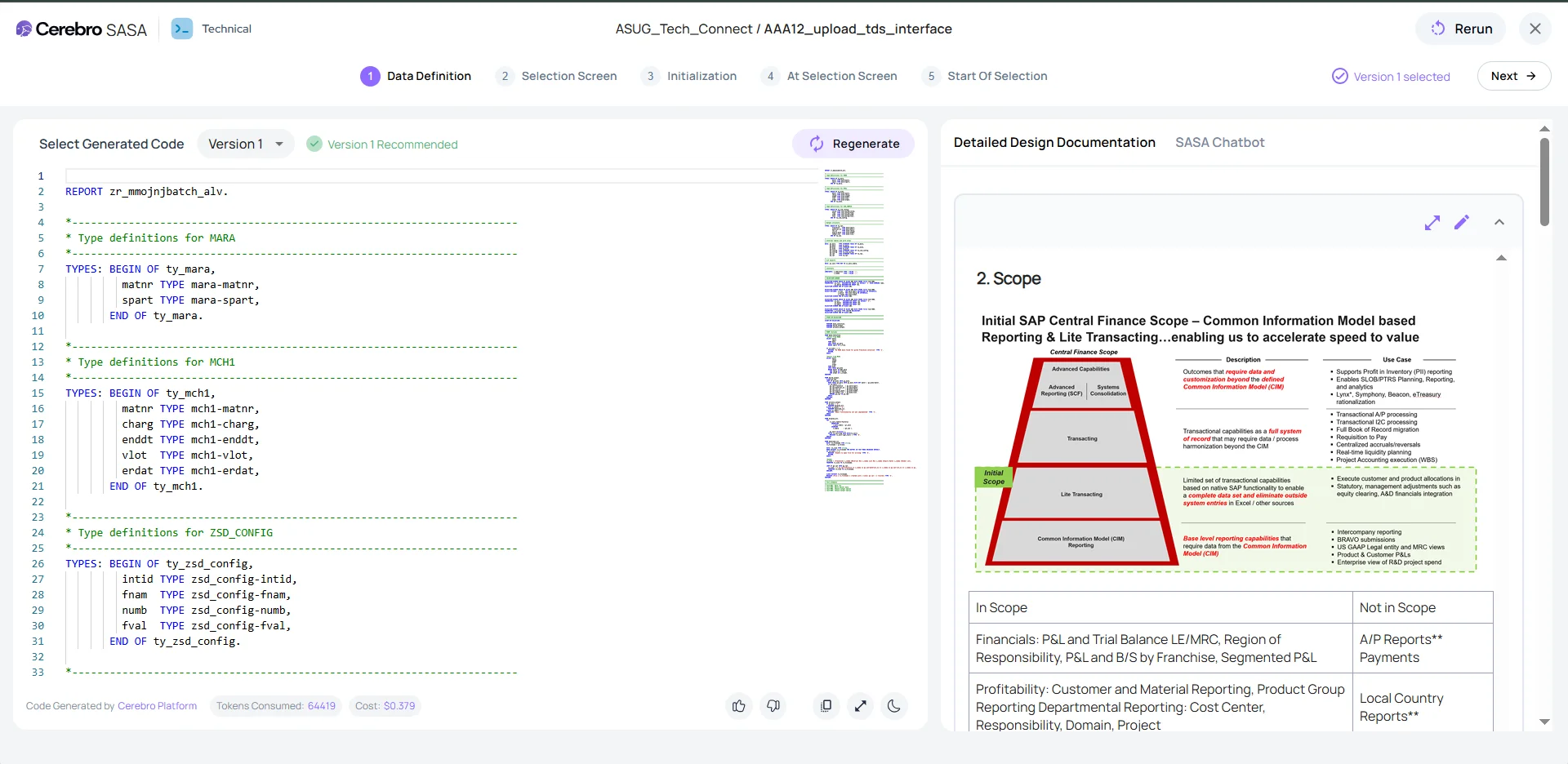
SASA generates clean, optimized ABAP code from TDS documents to accelerate SAP implementation and technical development workflows. It offers multiple code versions, automated syntax fixes, logical corrections, and AI-driven performance reviews. Developers can refine, compare, and regenerate code with guided AI assistance while supporting SAP Clean Core standards and maintainable development practices.
Key Benefits:
Reduces ABAP development time by up to 50%.
Supports maintainable, SAP-standard ABAP code aligned with SAP Clean Core principles.
Reduces defects early through automated code review and AI-assisted validation.
Technical Unit Test (TUT) Generation
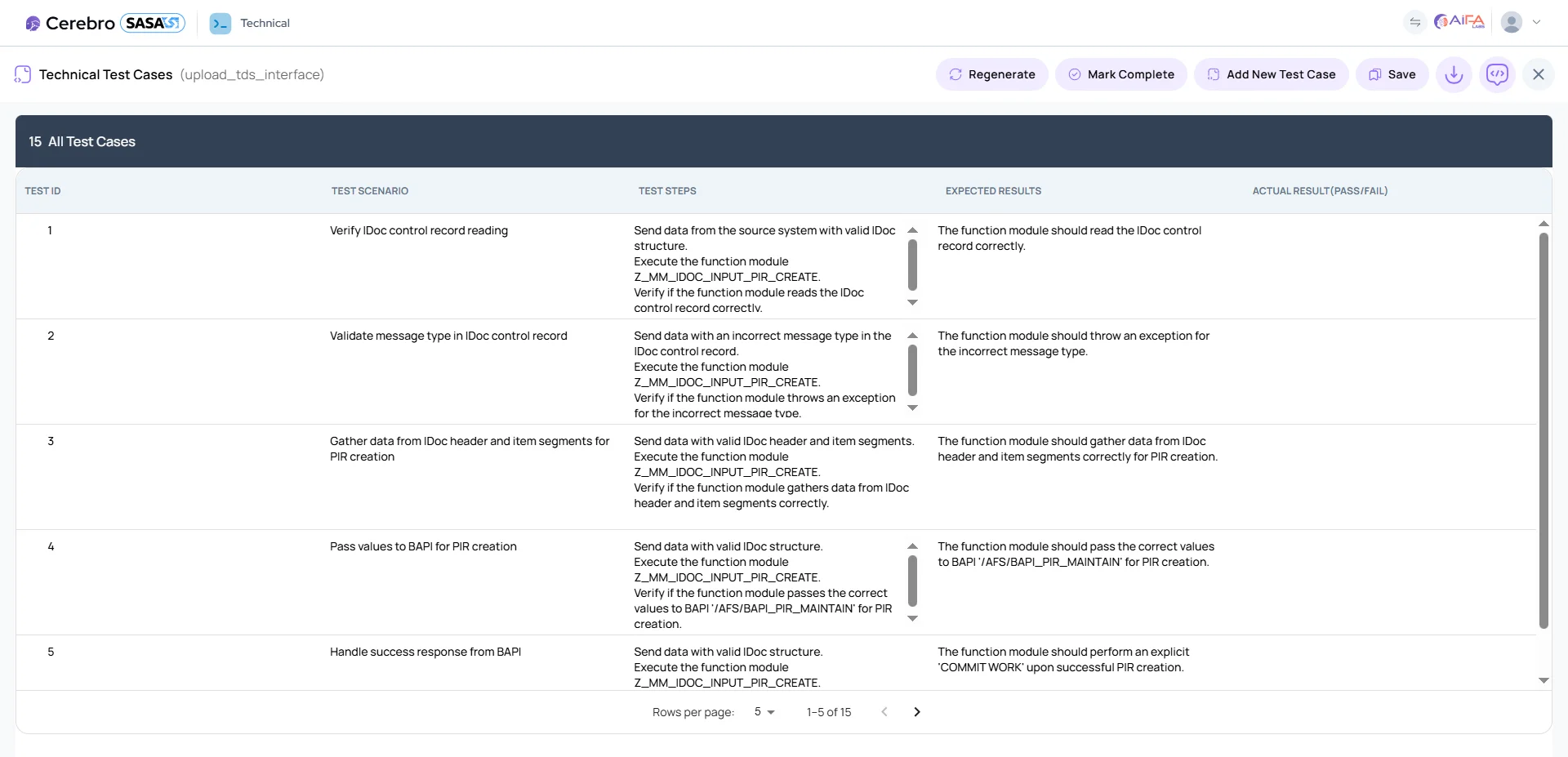
SASA auto-creates technical unit test documentation aligned with generated ABAP code, producing test cases with IDs, steps, expected results, and editable logic. Built for SAP testing automation, it helps technical teams validate development outputs earlier in the SAP SDLC and export ready-to-review documentation in Word or Excel, with chatbot guidance for test validation.
Key Benefits:
Improves unit test coverage across ABAP development workflows.
Reduces production defects through structured SAP testing automation.
Improves auditability, traceability, and QA consistency across SAP implementation projects.
Design Document Quality Checker
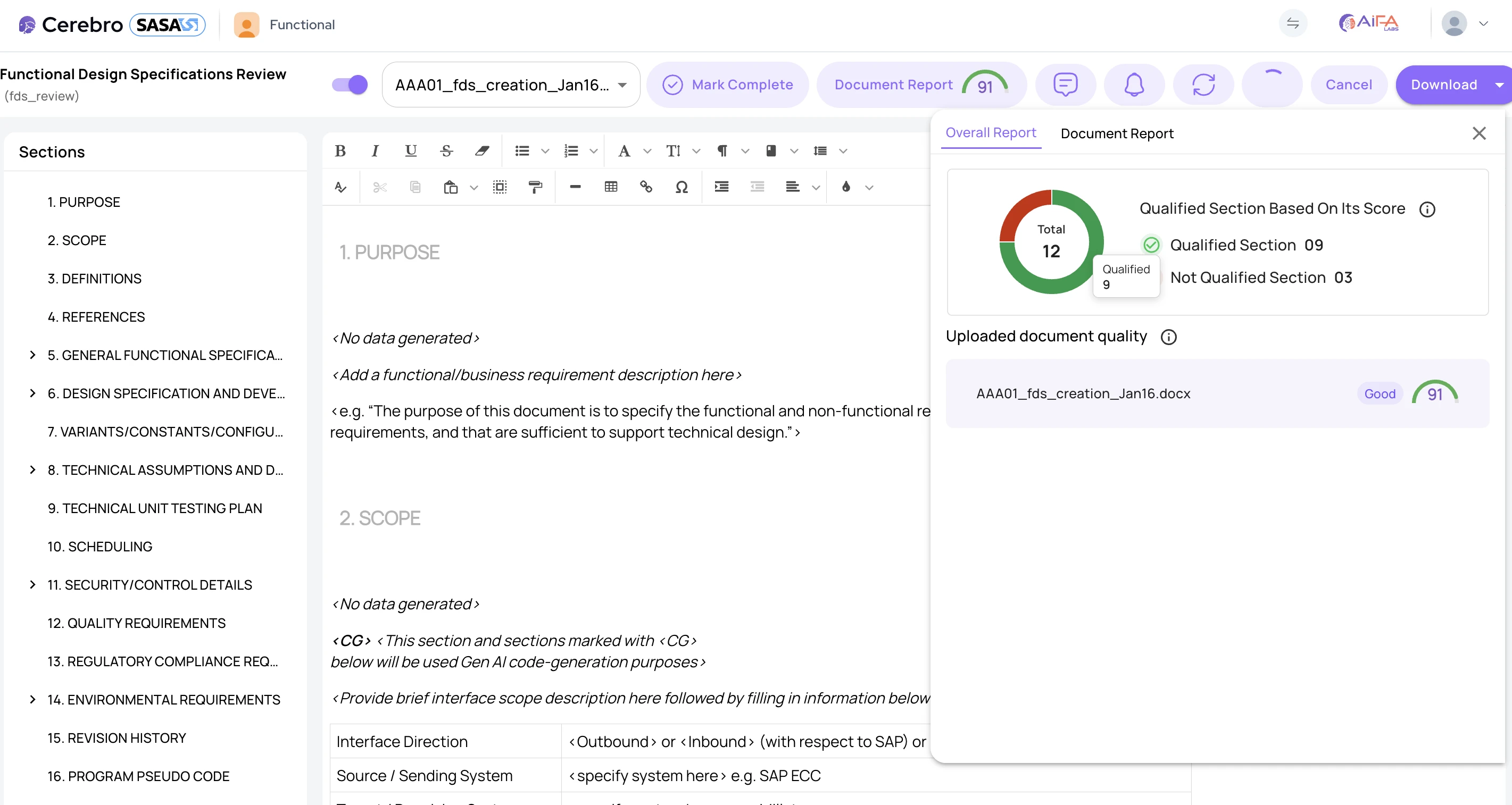
SASA reviews the completeness, consistency, and relevance of TDS and FDS documents across SAP implementation workflows. It provides an overall quality score and section-level breakdown based on customizable documentation standards, helping teams identify missing diagrams, tables, required sections, or misaligned content before development and testing begin.
Key Benefits:
Provides instant quality insights across SAP technical documentation and SAP functional specifications.
Allows teams to define mandatory document standards based on internal SAP SDLC requirements.
Improves documentation quality, reduces rework, and strengthens governance across SAP implementation projects.
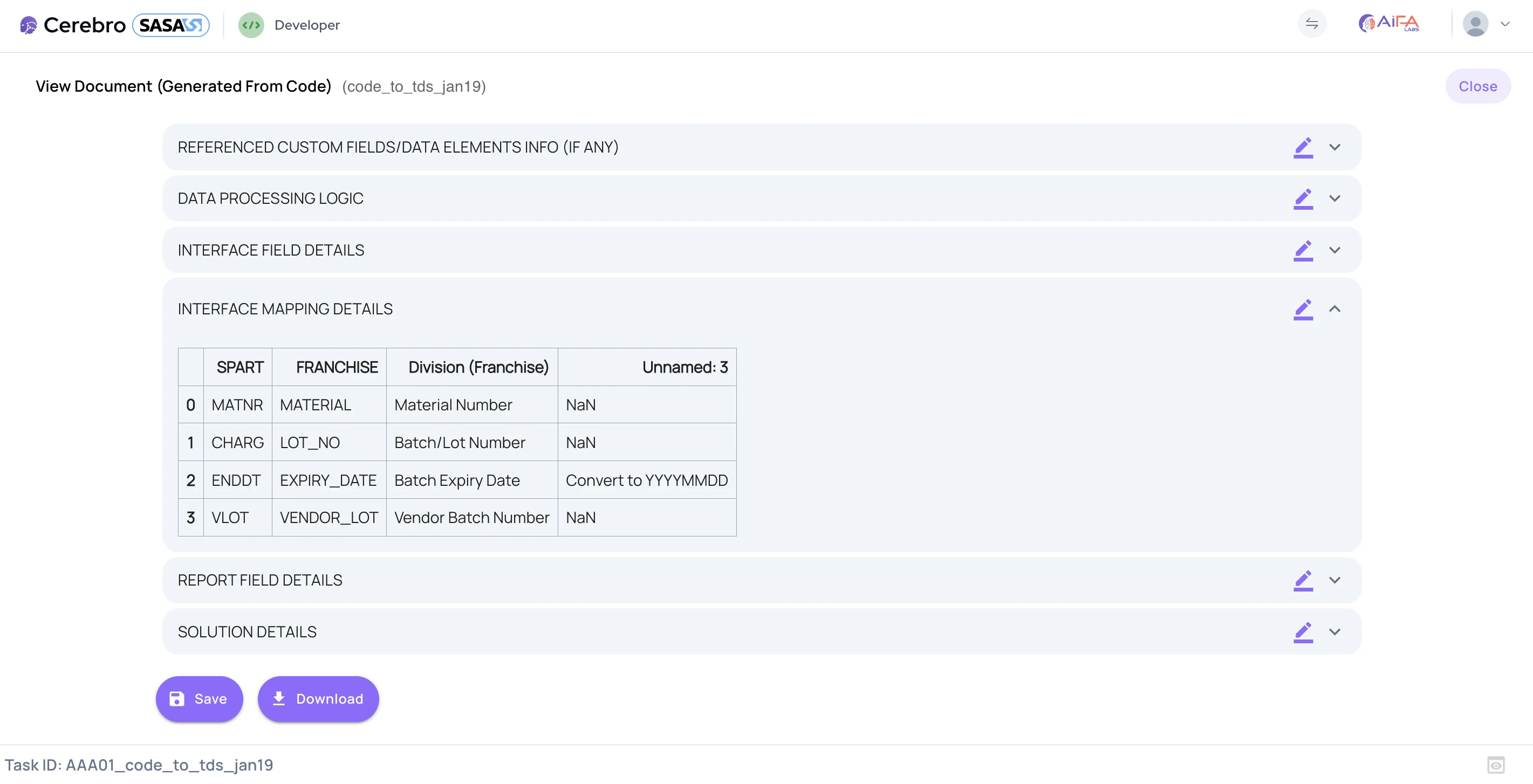
ABAP Code to Technical Specification Document
SASA analyzes existing ABAP code and converts it into a structured, ready-to-use technical specification document. It extracts business logic, workflows, dependencies, and technical behavior to streamline SAP technical documentation, reduce manual reverse-engineering effort, and support knowledge transfer across SAP implementation and modernization projects.
Creates clear, consistent SAP technical documentation aligned with your team’s preferred format and level of detail.
Improves knowledge transfer between developers, testers, and functional teams across ABAP development workflows.
How Roles Shape the Platform
Each persona represents a distinct function within the platform, from administration to daily operations. By assigning clear boundaries and capabilities, the system supports better governance, smoother collaboration, and consistent execution across teams.
Admin Persona
The Admin Persona gives teams control over platform configuration, governance, and usage across the enterprise AI platform. Admins can manage LLM connections, set usage limits, configure databases, define project structures, and manage templates. A centralized dashboard provides visibility into productivity, cost, and system activity to support compliance, monitoring, and troubleshooting.
Accelerates SAP Technical development workflow.
Reduces defects through AI-driven review and testing.
Maintain consistent technical standards across projects.
Technical Persona
The Technical Persona supports AI-driven TDS creation, ABAP code generation, TUT creation, and technical validation. It helps users check template compliance, regenerate code, fix bugs, and refine documentation through SASA Write.
Reduces defects through AI-driven review and testing.
Accelerates SAP technical development workflows.
Maintains consistent technical standards across projects.
Functional Persona
Functional Persona enables users to create FDS documents, auto-generate FUT/SIT test cases, navigate RICEFW objects, validate with Clean Core and AI scoring, and refine content using SASA Write. All outputs are downloadable in ready-review formats.
Speeds up testing preparation and reduces manual effort.
Ensures accurate requirement documentation.
Delivers full traceability across objects and artifacts.
Developer Persona
Developer Persona enables developers to generate, refine, debug, and optimize ABAP code with AI assistance. It supports code comparison, auto-fix, regeneration, and immediate access to TUT documentation for validation.
Reduces rework with structured workflows and AI guidance.
Migrator Persona
The Migrator Persona automates the creation of SAP migration specifications, mappings, validation rules, and test cases. By uploading legacy files, users can generate transformations, checks, and documentation with AI-assisted validation.
Reduces manual mapping and rule-building effort.
Ensures accurate, consistent migration documents.
Improves migration quality and go-live readiness.
FAQ
Questions About SASA and SAP SDLC Automation
SASA supports SAP implementation through AI-powered features for functional design specification creation, technical design specification generation, ABAP code generation, functional and technical unit test creation, system integration test migration, design document quality review, and ABAP code-to-documentation conversion.
SASA automates key stages of the SAP SDLC by helping teams move from business requirements to functional specifications, technical designs, generated ABAP code, test cases, validation outputs, and documentation reviews. This helps reduce manual effort, improve consistency, and support faster SAP delivery.
Yes. SASA can generate functional design specification documents from business requirements and technical design specification documents from functional specifications. This supports stronger documentation consistency, better handoff between teams, and improved traceability across SAP implementation workflows.
Yes. SASA supports ABAP code generation from technical design specification documents. It can generate multiple code versions, support syntax fixes, assist with logical corrections, review code quality, and help developers refine, compare, debug, and optimize ABAP code.
SASA supports SAP testing automation by generating functional unit test cases, technical unit test documentation, and system integration test updates. It helps teams create test scenarios, steps, expected results, and validation documentation aligned with functional specifications, technical designs, and generated code.
SASA helps with SAP migration, SAP S/4HANA migration, and SAP upgrades by identifying unchanged, updated, and missing test scenarios, supporting side-by-side comparisons, regenerating impacted test cases, and maintaining test continuity across changing SAP environments.
SASA improves documentation quality through its Design Document Quality Checker, which reviews FDS and TDS documents for completeness, consistency, relevance, required sections, missing diagrams, tables, and misaligned content. It provides quality scoring and section-level feedback to help teams improve documents before development and testing begin.
SASA supports role-based workflows for Admin, Technical, Functional, Developer, and Migrator personas. Each persona gives users access to specific tools, permissions, and workflows that support better governance, smoother collaboration, and more consistent execution across SAP projects.